Payouts to your bank
The money customers paid online, and where it is right now. Online payments are rolling out — availability depends on your account.
When online payments are on for your account, you can see where the money is without logging in somewhere else. Online invoice payments are rolling out, and availability depends on your account.
14-day free trial · No credit card required
Included in: Every paid plan. Each card or bank payment has a processing fee. See what a payment costs
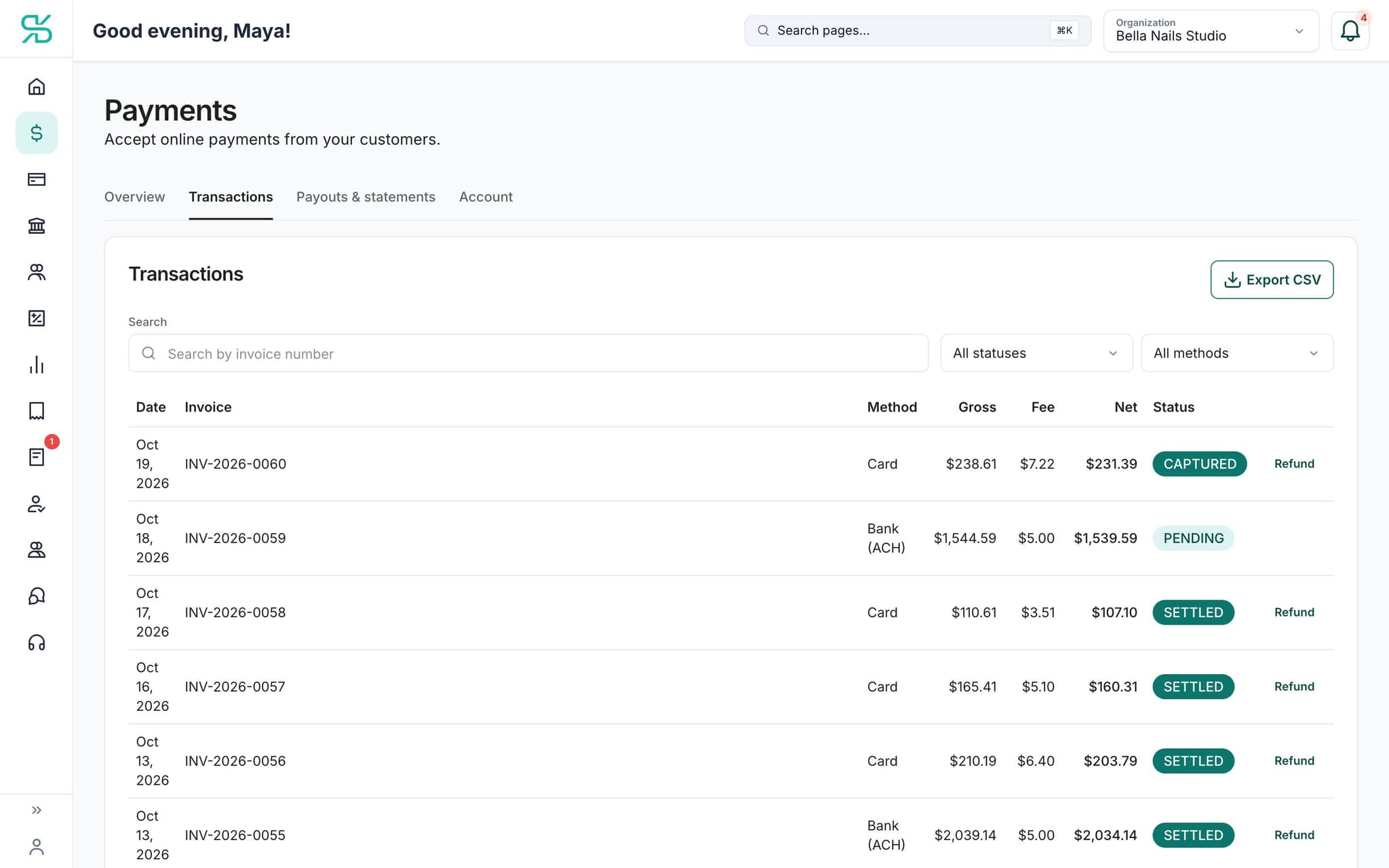
Each payment with its fee, net and status. Sample data; online payments are rolling out and availability depends on your account.
What it does
Track what has settled to your bank account and what is still on the way.
Card payment to bank deposit
Follow money from the invoice your customer paid to the deposit that lands in your account.
Fees are visible
The processing fee is recorded rather than quietly absorbed into a smaller deposit.
Nothing to reconcile by hand
The payout, the fee and the income all post, so the bank line matches the books.
How it works
How payouts to your bank works
- 1
A customer pays an invoice
By card, from the invoice itself.
dynatax.ai/client/…/dashboard/financial/invoices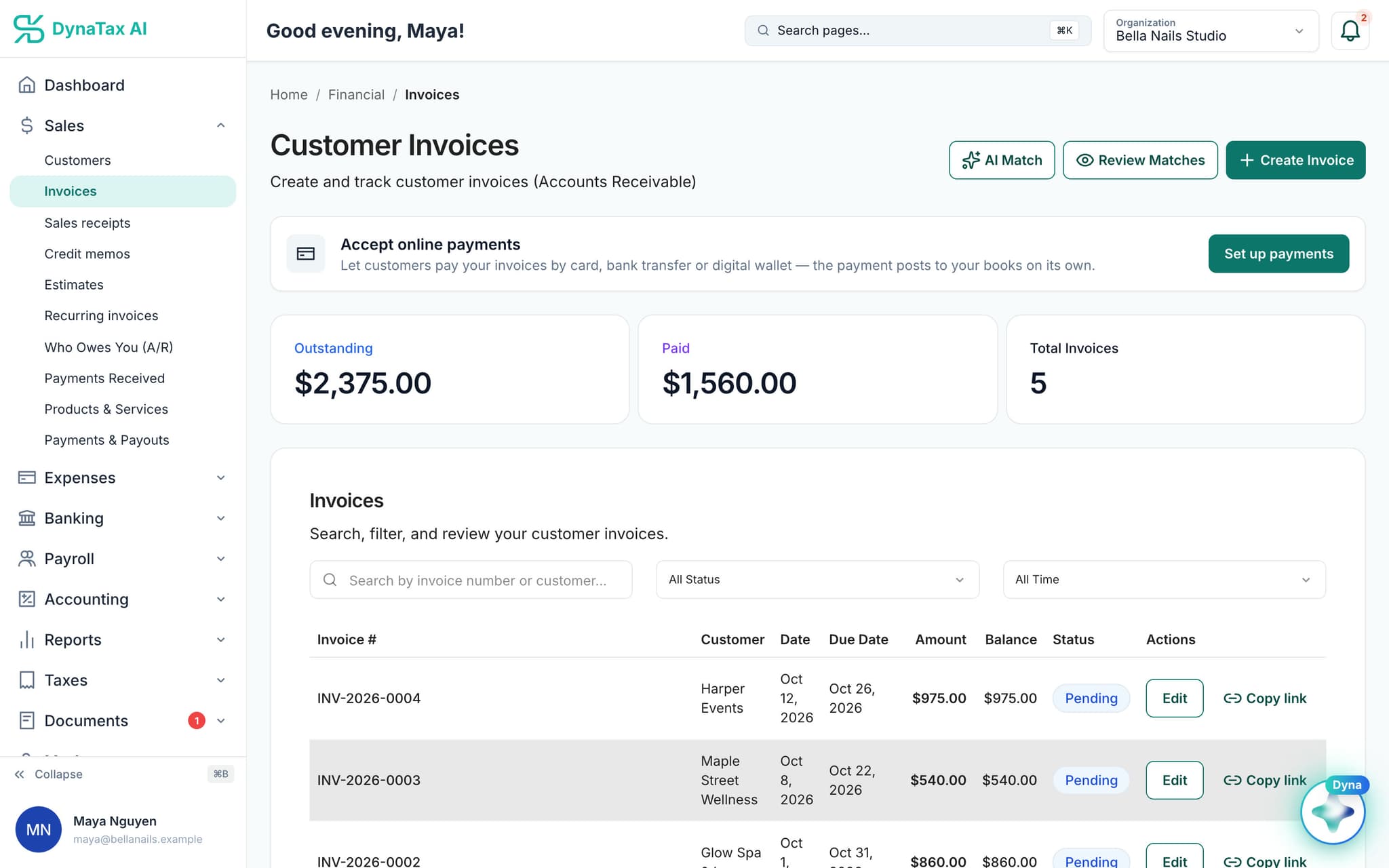
Paid invoices roll into your totals. Sample data.
- 2
The payout is scheduled
Card payments reach your bank the next business day. Bank payments take up to 5 business days.
- 3
It reaches your books
Deposit, fee and income are recorded against the invoice they came from.
What a payment costs
See what you keep before you send the invoice
One flat rate per payment: 2.65% + 25¢ for a card paid on an invoice, 2.5% + 10¢ for a card in person, and 1%, capped at $10, 50¢ minimum for a bank payment. The fee comes off before the deposit reaches your bank. Card processing by Fiserv.
$50.00 invoice
- Card on an invoice
- $48.42$1.58 fee
- Card in person
- $48.65$1.35 fee
- Bank (ACH)
- $49.50$0.50 fee
$250.00 invoice
- Card on an invoice
- $243.12$6.88 fee
- Card in person
- $243.65$6.35 fee
- Bank (ACH)
- $247.50$2.50 fee
$1,000.00 invoice
- Card on an invoice
- $973.25$26.75 fee
- Card in person
- $974.90$25.10 fee
- Bank (ACH)
- $990.00$10.00 fee
$2,500.00 invoice
- Card on an invoice
- $2,433.50$66.50 fee
- Card in person
- $2,437.40$62.60 fee
- Bank (ACH)
- $2,490.00$10.00 fee
- In your bank: cards next business day, bank payments up to 5 business days.
What you keep after the fee. American Express is 3.15% + 25¢ on an invoice and 3% + 10¢ in person. A $3.50 monthly regulatory fee applies, and a $20 monthly minimum in processing fees in a month you take card payments. These are examples: your fees depend on your own statement and card activity, and your exact rates are confirmed on the merchant application you sign when you turn payments on. Every fee, explained
Card or bank payment?
A card payment reaches your bank faster. A bank payment costs far less on a large invoice, because its fee is capped, but it takes longer to arrive. On a $5,000 invoice the bank payment keeps $122.75 more. You can offer both and let the customer choose.
| $5,000 invoice | Card | Bank (ACH) |
|---|---|---|
| Fee | $132.75 | $10.00 |
| You keep | $4,867.25 | $4,990.00 |
| In your bank | Next business day | Up to 5 business days |
Business days do not count weekends or bank holidays. A bank payment often arrives sooner than five days; plan on the longer time. You see every payment as pending until it lands, under Sales → Payouts.
A sample month, and the same business over a year
A small service business taking about $13,500 a month: invoices paid by card, a few cards at the counter, and larger jobs paid by bank. An example only: a real statement depends on the merchant's own activity, such as the card types customers use, how cards are taken and the month's volume.
| One month, flat-rate pricing | Volume | Fees |
|---|---|---|
| Cards paid on invoices30 payments × $250.00 | $7,500.00 | $206.40 |
| Cards in person20 payments × $60.00 | $1,200.00 | $32.00 |
| Bank payments (ACH)4 payments × $1,200.00 | $4,800.00 | $40.00 |
| Regulatory fee (set by the card processor) | $3.50 | |
| Monthly minimum top-upNone: processing fees were over the minimum | $0.00 | |
| Total | $13,500.00 | $281.90 |
- You keep this month
- $13,218.10
- Effective rate, month
- 2.09%
- Volume
- $162,000.00
- Processing fees (12 months)
- $3,340.80
- Regulatory fee (12 months)
- $42.00
- PCI compliance program (set by the card processor)
- $119.00
- Total fees for the year
- $3,501.80
- Effective rate, year
- 2.16%
Over a year, flat-rate pricing
Flat rate or effective rate? The flat rate is the price set for each kind of payment, the same for every customer and every card. The effective rate is what the month cost in the end: total fees divided by everything you took in. Here it comes out at 2.09%, below the card rate, because the bank payments are capped at $10 each. A month of only small card payments would come out a little above the card rate, because of the fixed amount added to each payment.
Flat rate or interchange-plus: where the difference shows
The same business at higher volume. With the flat rate, fees grow in step with sales and the rate stays about the same. Interchange-plus passes through what each card actually costs plus a markup, so from about $20,000 a month it is worth comparing. Its price depends on your card mix, so it is quoted from your statement rather than shown here.
$13,500 a month
Flat rate is simpler
- Fees a month
- $281.90
- A year
- $3,501.80
- Effective rate
- 2.09%
$27,000 a month
IC+ worth a quote
- Fees a month
- $560.30
- A year
- $6,842.60
- Effective rate
- 2.08%
$54,000 a month
IC+ worth a quote
- Fees a month
- $1,117.10
- A year
- $13,524.20
- Effective rate
- 2.07%
$108,000 a month
IC+ worth a quote
- Fees a month
- $2,230.70
- A year
- $26,887.40
- Effective rate
- 2.07%
Same mix as the sample month, scaled up; a year includes the annual PCI fee. Examples only; your fees depend on your own statement and card activity.
Taking more than $20,000 a month in cards?
Consider interchange-plus pricing: you pay what each card actually costs plus a markup, which can come out lower than the flat rate at higher volume. There is no single price to show: it depends on your card mix and the activity on your statements, so it is quoted from a recent statement.
The details
Payouts to your bank, in detail
Set up from your invoices
The invoices page offers to set up payments, so customers can pay by card, bank transfer or digital wallet. Until that is on, you send invoices and record payments the way you do today.
One Payments page
Payments you receive, payments you make and payouts to your bank live on one Payments page in DynaTax AI. A payout tab shows what has settled and what is still on its way.
The fee stays visible
A payout is smaller than the sales behind it because of the processing fee. Recording the fee as its own expense keeps your income true and the deposit matching your bank line.
Recording payments still works
Online payment is optional. Cash, checks and transfers you receive are recorded against the invoice, and they reach your books and your receivables just the same.
Trust
Your books, on your terms
Read-only bank connection
You sign in on your bank’s own screen. DynaTax AI can see balances and transactions. It can’t move money.
You stay in control
Nothing posts without your approval, except merchants you’ve already confirmed above the auto-post threshold.
Your data isn’t training data
Your data isn’t used to train AI unless you turn on Allow AI Training. It’s off by default.
A professional when you want one
Invite your own CPA into your books, or find one in the marketplace. Dyna’s answers are general information, not professional advice.
Plans
Where payouts to your bank is included
Every paid plan. Each card or bank payment has a processing fee. Every plan starts with a 14-day free trial, no credit card required. Pay yearly and get 12 months for the price of 10.
Bring your books with you: import transactions, your chart of accounts, opening balances, customers, vendors, invoices and bills from CSV, Excel or a QBO/OFX bank download. Switching from QuickBooks
- Starter$29 / month · 1 user
- GrowthRecommended$49 / month · 3 users
- Pro$99 / month · 10 users
Related features
Works well with
FAQ
Payouts to your bank questions
Run your business. Live your life.


Try payouts to your bank with your own books for 14 days. Less time on the books, more time for everything else.
No credit card required