Bookkeeping for freelancers who’d rather be doing the work
Dyna sorts each transaction for you to approve, keeps business apart from personal, and keeps your client payments straight. Less time on the books, more evenings back.
14-day free trial · No credit card required
Your week, before and after
Less admin between clients
Freelancing is three jobs: the work, finding the work, and the paperwork. DynaTax AI makes the third one smaller.
Before
Client payments land in the same account as your rent, your groceries and your streaming subscriptions.
With DynaTax AI
Business and personal, apart
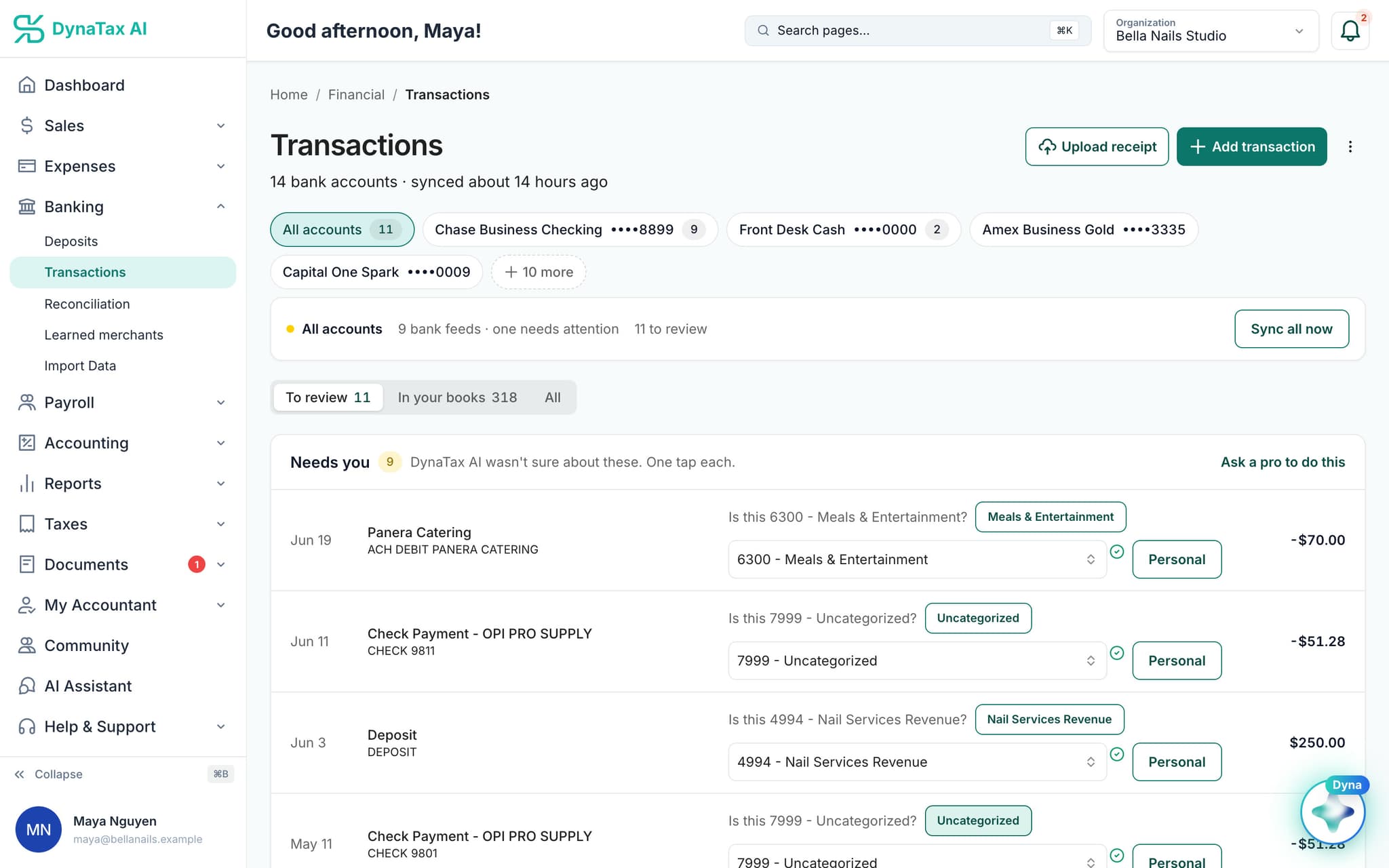
Dyna suggests an account for each transaction with a confidence score. Tap Personal on the ones that aren’t business and approve the rest.
Before
A deposit arrives and you can’t remember which client or which invoice it was for.
With DynaTax AI
Every payment explained
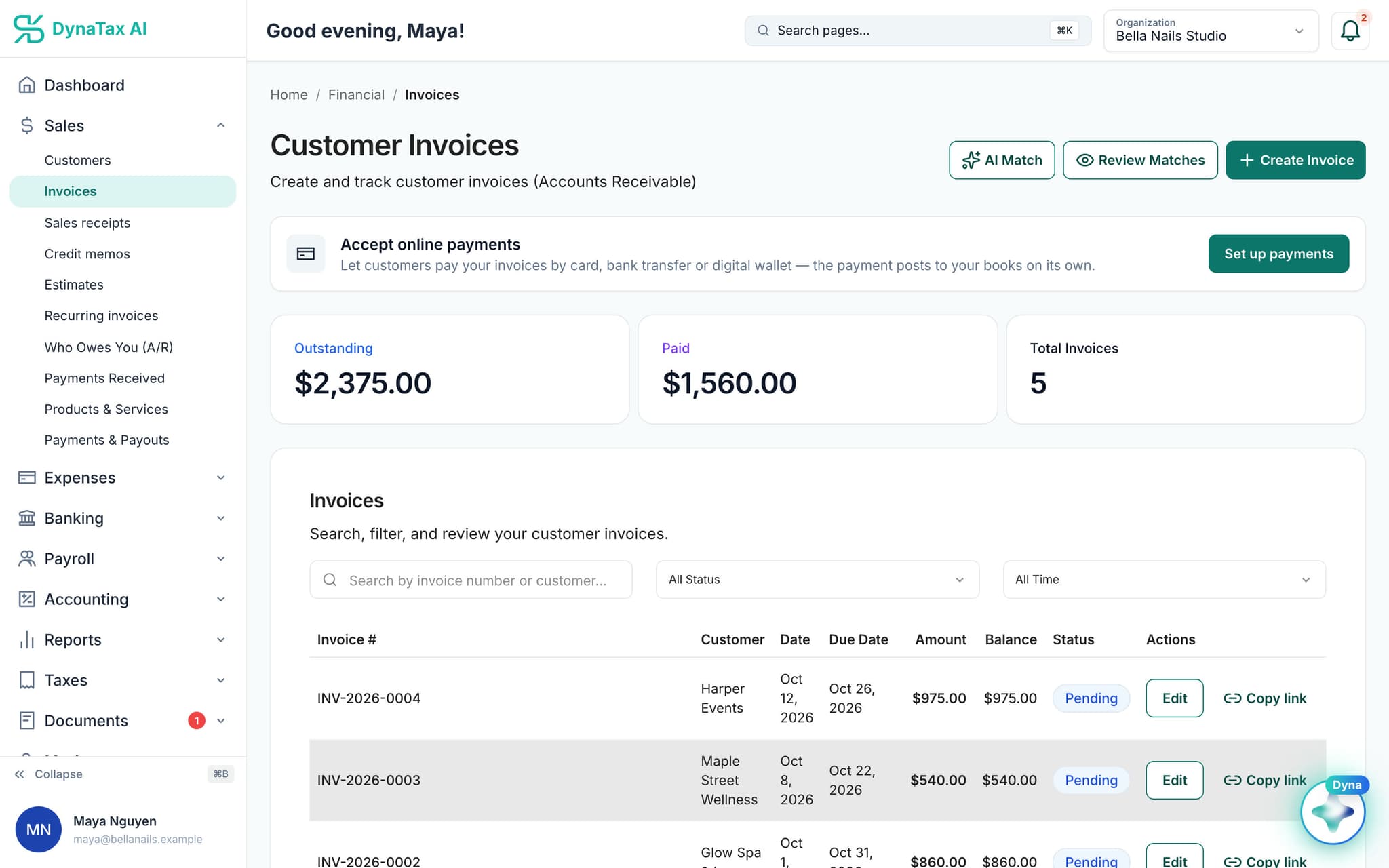
Send invoices from DynaTax AI. When a deposit matches nothing in your books, Dyna asks what it was: a customer paying an invoice, your own money, a refund. One tap.
Before
Receipts live in your camera roll and the miles to client meetings live in your head.
With DynaTax AI
Receipts and miles, logged
Photograph a receipt and Dyna reads the vendor, date and total for you to check. Log each business trip and it’s valued at the IRS rate for that year.
See it working
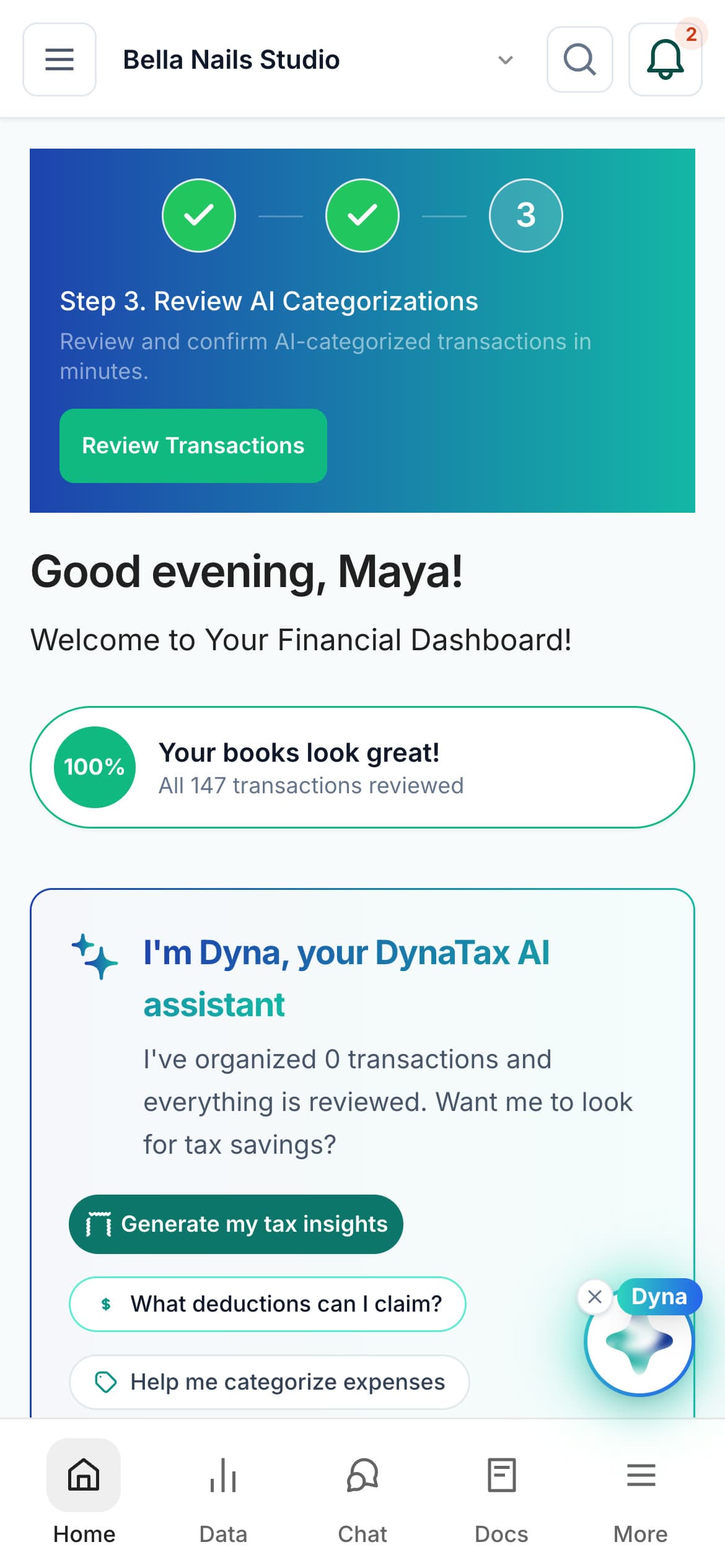
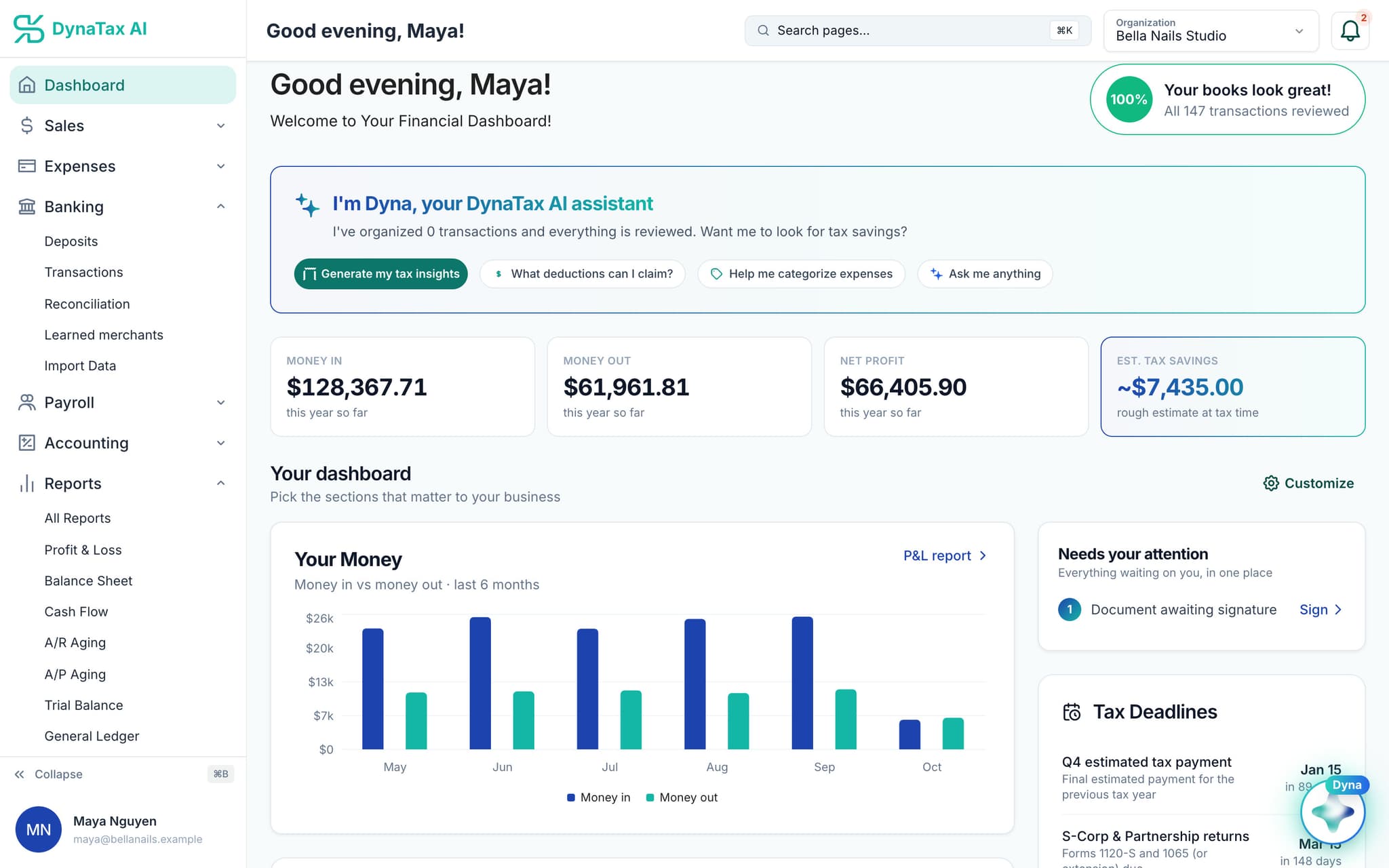
Your freelance books, on real screens
Shown with sample data from a demo business. Yours fill with your own clients and expenses.
Self-employed taxes
Your 1099 income, already in your books
When the 1099s from your clients arrive in January, the income they report is already recorded, payment by payment. You have something to check them against.
Accounts that follow Schedule C
As a sole proprietor or single-member LLC, your chart of accounts carries the Schedule C line for each account, so your CPA sees your year the way the form does.
Tax deadlines on your dashboard
Upcoming dates, like the next quarterly estimated payment, sit on your dashboard with the days left, so they stop sneaking up on you.
An estimate before April
On the Pro plan, Tax Insights estimates self-employment tax from your books and points at ideas such as a SEP-IRA or an S-Corp election to discuss with your CPA.
Ask Dyna the 11pm question
Is a coworking day pass deductible? Dyna answers general tax and bookkeeping questions and lists its sources. It’s general information, not professional advice.
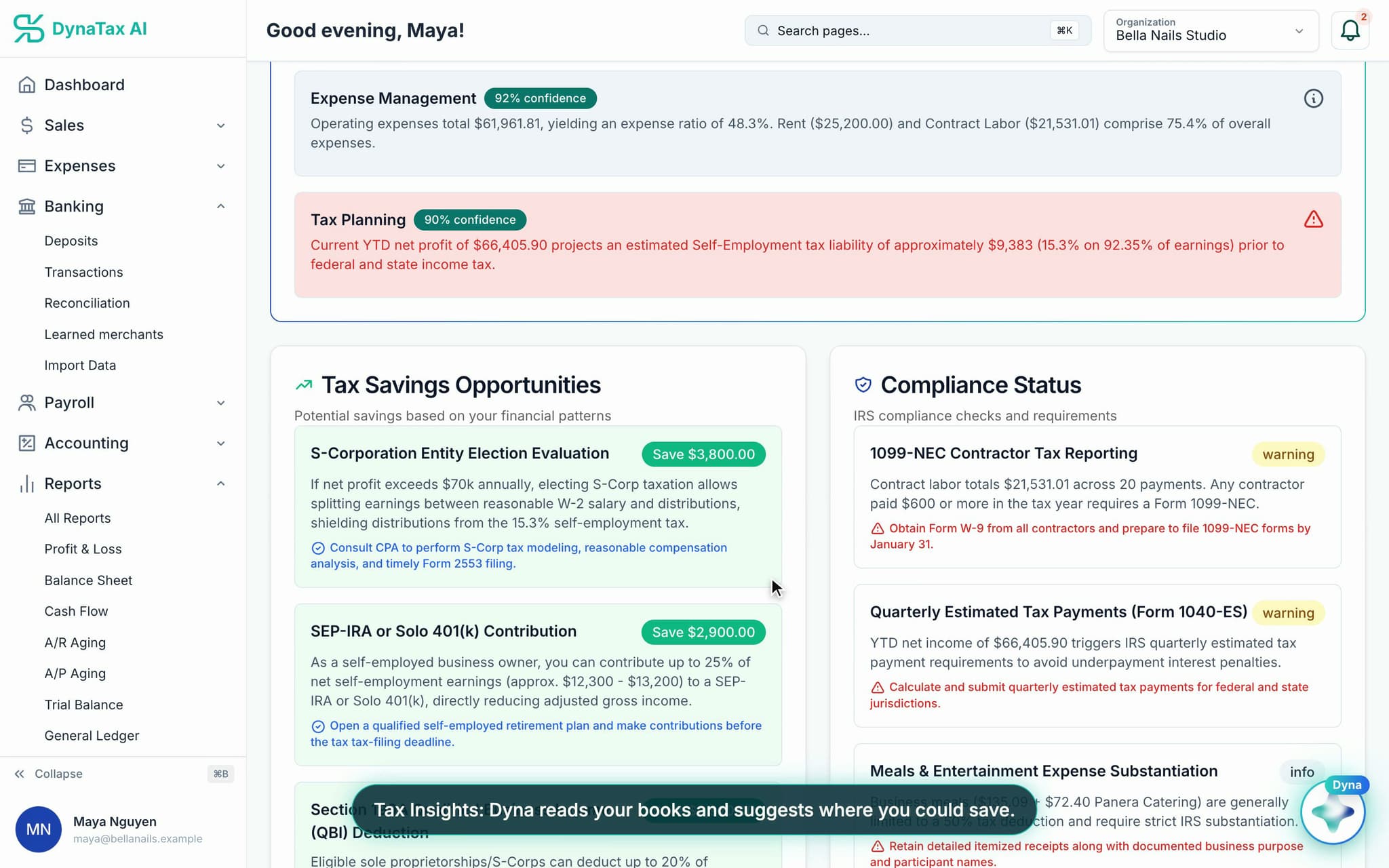
Tax Insights is an estimate, not a filed return. DynaTax AI doesn’t file tax returns yet. For anything consequential, invite your own CPA or find a tax professional in the DynaTax AI marketplace.
Bring your books
Starting mid-year? Bring what you have.
Download your bank history or export from your old software, upload it, and pick up where you left off. Then connect your bank so new transactions arrive every day.
From your bank or old software
- CSV
- Excel
- QBO / OFX
What comes in
- Transactions
- Chart of accounts
- Opening balances
- Journal entries
- Customers
- Vendors
- Invoices
- Bills
Each file is checked before anything is written. QuickBooks company files (.QBW, .QBM) can’t be uploaded; export to CSV or Excel first.
Pricing
Most freelancers start on Growth
Bookkeeping, bank feeds, receipt capture, reconciliation and reports come with every paid plan. Growth adds users, storage and AI queries. Pro adds Tax Insights.
Starter
Small Businesses
$29/ month
- Complete double-entry bookkeeping
- Bank feed, receipt capture, reconciliation, close the books
- P&L, Balance Sheet, Cash Flow, General Ledger, Trial Balance
- Invite your own CPA into your books — messages, tasks, e-sign
- 1 user · 50 GB storage · 500 AI queries/month
Growth
Growing Businesses
$49/ month
- Complete double-entry bookkeeping
- Bank feed, receipt capture, reconciliation, close the books
- P&L, Balance Sheet, Cash Flow, General Ledger, Trial Balance
- Invite your own CPA into your books — messages, tasks, e-sign
- 3 users with roles and permissions
- 100 GB storage · 850 AI queries/month
Pro
Established Businesses
$99/ month
- Everything in Growth, plus:
- Inventory & cost of goods sold
- Fixed assets & depreciation
- Job costing — cost codes and construction loan draws
- AI Tax Insights — what you owe, from your own books
- 10 users with roles and permissions
- 200 GB storage · 1,700 AI queries/month
Every plan starts with a 14-day free trial. No credit card required.
Compare all plansFAQ
Common questions
Also built for
Run your business. Live your life.


Fewer evenings on the books. Try DynaTax AI with your own clients for 14 days.
14-day free trial · No credit card required